
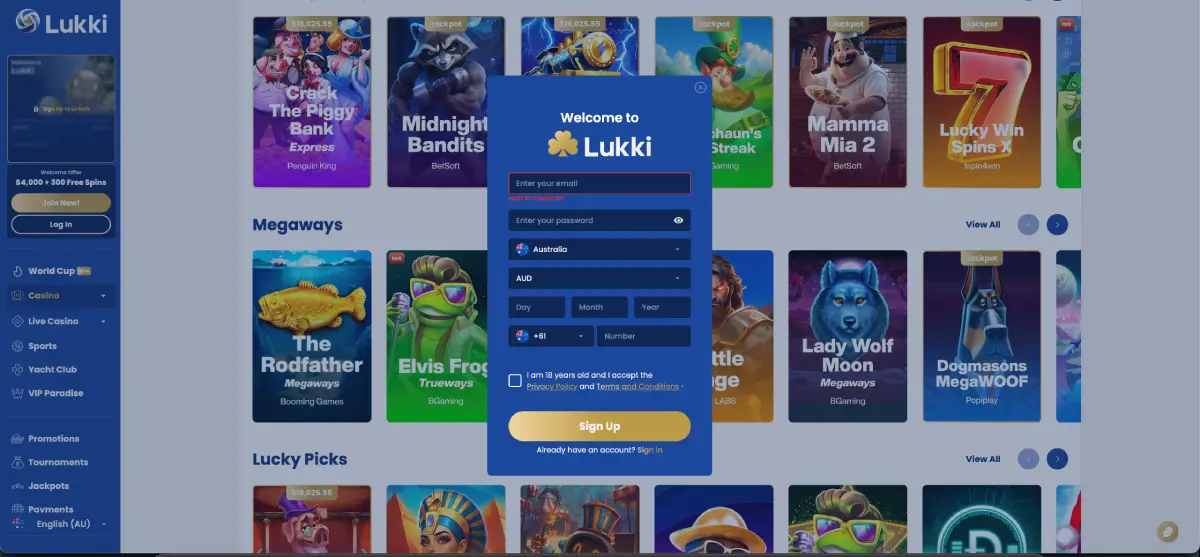
Lukki casino registration takes a single screen. The sign-up form opens as a modal window layered over the lobby rather than as a multi-step page, and asks for an email address, a password, country, currency, date of birth and a mobile number — with a confirmation checkbox covering age and terms. There is no lengthy questionnaire, no address form at this stage and no document upload.
What makes the process worth approaching carefully despite its brevity is that two of the fields have lasting consequences. The currency selected here governs every cashier limit applied afterwards and is not normally changeable later. And the name and date of birth entered need to match the identification documents used for verification, because a mismatch is the single most common reason a first withdrawal is delayed.
This guide covers the form field by field, what happens immediately after registration, how the first deposit bonus attaches, what verification will later require, and the issues that most often interrupt a sign-up.
| Registration detail | Requirement |
|---|---|
| Where to register | lukkicasau.com — Join Now! in the sidebar or on any banner |
| Form type | Single-screen modal window |
| Email address | Required — becomes the login identifier |
| Password | Required, case-sensitive, with visibility toggle |
| Country | Australia |
| Currency | AUD — set at registration, not normally changeable later |
| Date of birth | Day, Month and Year fields |
| Mobile number | Required, with +61 country code |
| Age confirmation | Mandatory checkbox — 18+ |
| Terms acceptance | Privacy Policy and Terms and Conditions, linked in the form |
| Documents at sign-up | Not required — verification comes later |
| First deposit bonus | 100% up to AUD 500 + 100 Free Spins, no code needed |
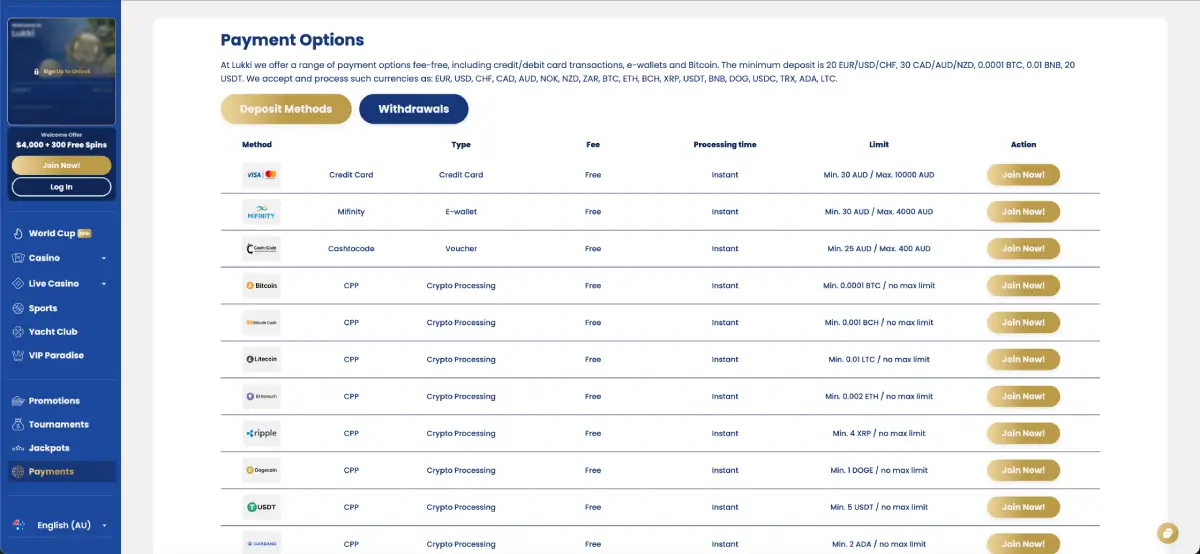
| Minimum deposit | AUD 30 by card or Mifinity, AUD 25 by Cashtocode |
| Accounts per person | One |
How to register at Lukki casino
The Join Now! button appears in the pinned sidebar block on every casino page and on every promotional banner, so the form is reachable from anywhere on the site. In the sportsbook, the equivalent control is Sign up in the top-right corner of the horizontal navigation bar.
Step-by-step sign-up
- Open lukkicasau.com and select Join Now! in the sidebar, or Sign up in the sportsbook top bar. The registration window opens over the current page.
- Enter your email address. This becomes your login identifier and the channel for confirmations and password recovery, so use an address you control and can access reliably.
- Create a password. The field includes an eye icon to reveal the entry — use it to check for typos before submitting. Choose something not reused on other sites.
- Set the country to Australia in the dropdown. The field defaults to a flagged selector.
- Confirm the currency reads AUD. It populates from the country selection, but the field is editable, and this is the value that determines your cashier limits from that point onwards.
- Enter your date of birth across the separate Day, Month and Year fields. This must be accurate — it is checked against your identification during verification.
- Add your mobile number with the +61 country code selected in the adjacent dropdown.
- Tick the confirmation box stating you are 18 years old and accept the Privacy Policy and Terms and Conditions. Both documents are linked directly in the form.
- Select Sign Up. The account opens and the sidebar panel unlocks, replacing the Sign Up to Unlock prompt with your balance and Yacht Club counters.
Anyone who opens the registration window by mistake can switch to the login form using the Already have an account? Sign in link at the bottom rather than closing and starting over.
Choosing AUD as your account currency
This is the field that most repays a second look. The currency selected during registration governs the deposit minimums, deposit ceilings, withdrawal minimums and withdrawal ceilings applied to the account, and it is not normally changeable once set. With AUD selected, the cashier displays:
- Card deposits from AUD 30 up to AUD 10,000
- Mifinity from AUD 30 up to AUD 4,000, both directions
- Cashtocode vouchers from AUD 25 up to AUD 400, deposits only
- Bank transfer withdrawals from AUD 300 up to AUD 6,000
Lukki supports EUR, USD, CHF, CAD, AUD, NOK, NZD and ZAR alongside a range of cryptocurrencies, so the field can be changed — but an Australian player selecting a different fiat currency would face conversion at deposit and withdrawal, and the AUD limits above would no longer be the ones applied. Confirm AUD before submitting rather than after.
What happens immediately after registration
Signing up unlocks the parts of the platform that were previously display-only:
- The account panel in the sidebar, showing balance and Yacht Club level in place of the locked prompt
- The cashier, with AUD deposit and withdrawal limits applied
- Real-money play across Slots, Live, Instant Win, Table Games and The Diamond Club
- Live dealer tables from Live Vegas, Imagine Live, ICONIC21 and Platipus
- The sportsbook and bet slip, covering pre-match, In-Play and Virtual Sports
- Bonus eligibility, starting with the first deposit offer
- Tournament entry for Only At Lukki and Global events
- Jackpot participation in the Football Frenzy and Lukki Jackpot pools
- Yacht Club enrolment, which is automatic — no opt-in required
The first deposit after registration
The account is open but empty. The first deposit activates the welcome package, and the opening stage is the one stage that requires no bonus code: 100% up to AUD 500 + 100 Free Spins.
- Open the Payments section from the sidebar.
- Choose a method — Visa or Mastercard from AUD 30, Mifinity from AUD 30, Cashtocode voucher from AUD 25, or crypto from the per-coin minimum.
- Enter the amount, keeping the AUD 500 bonus ceiling in mind: depositing above it does not increase the match.
- Confirm the transaction. All listed methods are fee-free and process instantly at the cashier stage.
- Check that the bonus has credited before starting to play.
An important decision sits at this point. The VIP First Deposit Bonus — 150% extra, a VIP trial and 10% cashback on a deposit of AUD 500 or more — is an alternative to the standard first deposit offer rather than an addition to it. The choice is made once, at the first deposit, so it is worth comparing both sets of terms on the Promotions page beforehand.
The subsequent stages require codes: LUKKI2 on the second deposit, LUKKI3 on the third and LUKKI4 on the fourth, each entered before the deposit is confirmed.
Account verification after registration
No documents are requested during sign-up. Verification is handled separately and is normally triggered before a first withdrawal is released. The standard document set covers:
- Proof of identity — a valid government-issued photo document such as a passport or driver licence, fully legible with all four corners visible
- Proof of address — a utility bill or bank statement, usually issued within the past three months, showing your name and registered address
- Proof of payment method — where a card or e-wallet was used, confirmation that it belongs to the account holder
Every detail on these documents needs to match what was entered at registration. This is why accuracy in the sign-up form matters more than its brevity suggests: a name entered informally, a transposed digit in the date of birth or an address that has since changed will all surface at verification, at the point when a withdrawal is pending.
The practical recommendation is to submit documents shortly after registering rather than waiting for the request. The check then runs in parallel with play instead of holding up a payout.
Registration requirements and restrictions
- Minimum age 18. The confirmation checkbox is mandatory and age is verified against identification documents later.
- One account per person. Duplicate accounts are normally closed when identified during verification. If you cannot access an existing account, use password recovery or contact support rather than registering again.
- Accounts are personal. An account cannot be operated on behalf of another person, and payouts are made to the verified account holder.
- Accurate details are required. Information entered at registration forms the basis of the verification check.
- Terms acceptance is binding. The Privacy Policy and Terms and Conditions linked in the form govern the account, including bonus rules and payout conditions.
Common registration problems
The form will not submit
Every mandatory field must be completed, including the age and terms checkbox, which is easy to overlook at the foot of the form. An incomplete field is highlighted rather than described, so scan the whole window before assuming a technical fault. Script-blocking browser extensions can also prevent submission — disabling them or switching browser usually resolves it.
The email address is already registered
An account already exists on that address. Use password recovery from the login form rather than registering with a second address, since duplicate accounts are closed at verification.
The mobile number is rejected
Check that the +61 code is selected in the dropdown and that the number is entered without a leading zero and without spaces or brackets.
The wrong currency was selected
Currency is not normally changeable after registration. Contact support through the chat widget before making a first deposit — the position is considerably harder to resolve once transactions have been processed.
No confirmation email arrives
Check the spam and promotions folders, as automated messages are frequently filtered there. If nothing appears after a second attempt, the address may contain a typo, and support can confirm what is on file.
Summary
Registration at Lukki is a single-screen process that takes a couple of minutes: email, password, Australia, AUD, date of birth, a +61 mobile number and a confirmation checkbox. The speed is genuine, but two fields deserve a second look before the form is submitted — the currency, because it sets every cashier limit that follows and cannot easily be changed, and the personal details, because they will be checked against identification documents at verification. Get both right at sign-up and the rest of the process, from the code-free first deposit bonus through to a first withdrawal, runs without the delays that catch most new accounts.